iOS6 구글맵 사용하기(How to Get Google Maps on iOS 6)
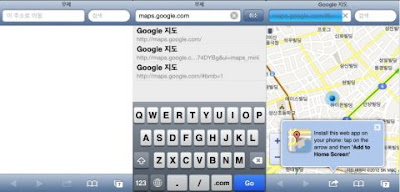
1. 먼저 iOS6의 사파리를 실행한다 2. 사파리 주소입력창에 'maps.google.com'를 입력 3 .사파리 브라우저 하단의 홈화면에 추가를 누르면 기기의 메인화면에 아이콘이 생성 4. iOS6 설정에서 사파리의 위치서비스 이용을 활성화 5. 구글 로그인 설정 Apple Maps only just launched to the public, but already it's drawn quite a bit of ire from iPhone users. Why? Well because it's not as accurate as Google Maps. And it doesn't have walking directions. And it doesn't have public transportation directions. And because it's already released a whole slew of entirely unfortunate misdirections that make it less trustworthy than Google Maps. But a quick search for the App Store reveals the unfortunate truth: There's no native Google Maps app in App Store. Fortunately, there is a solution. First, head to Maps.Google.com, which is Google's web app. It allows you to do basically everything Apple Maps cant. But it doesn't stop there - it also has a (beta) bike routes tab, which wasn't even on Google Maps in iOS 5. Obviousl...